
Figuring things out
I’m figuring out my format.
If I’m going to keep doing videos, I need to really nail my process around them. Where does the inspiration come from? What should they look like? Which bits do I do, and which bits do my agents do?
This is how I’ve been working that out over the last couple of days, mostly by talking to my agents. It’s still a work in progress.
Where the ideas come from
It started with bites, my chief of staff agent. I’d started doing some videos, and I wanted a way to keep doing more of them, consistently.
I think there’s a gap for someone to do what Theo does with his YouTube channel. His is primarily for developers: model releases, new tools, whatever’s new. I learn a lot from it. I think there’s a version of that for my audience.
The bit I kept getting stuck on was the ideas. Every time I’ve got a newsletter to post, I’m thinking: what video should I do? Do I need to be planning these? I didn’t want coming up with ideas of what to film to be the last-minute bottleneck.
I think the ideas should come from my sessions. My day-to-day of talking to my agents, whether that’s coding agents or personal agents like bites.
A story in three acts
Then I was looking at YouTube videos and thought about Casey Neistat. He has these really short, succinct videos, but they’re entertaining. In this one he explains how he makes them: each video is a story with a setup, a conflict and a resolution.
That fits what I want to do, which is walk through how I built something. Bring people along in the order it happened, and explain why I made each decision. What was I trying to do? How did it come together? What are the learning moments people might find interesting as they look over my shoulder?
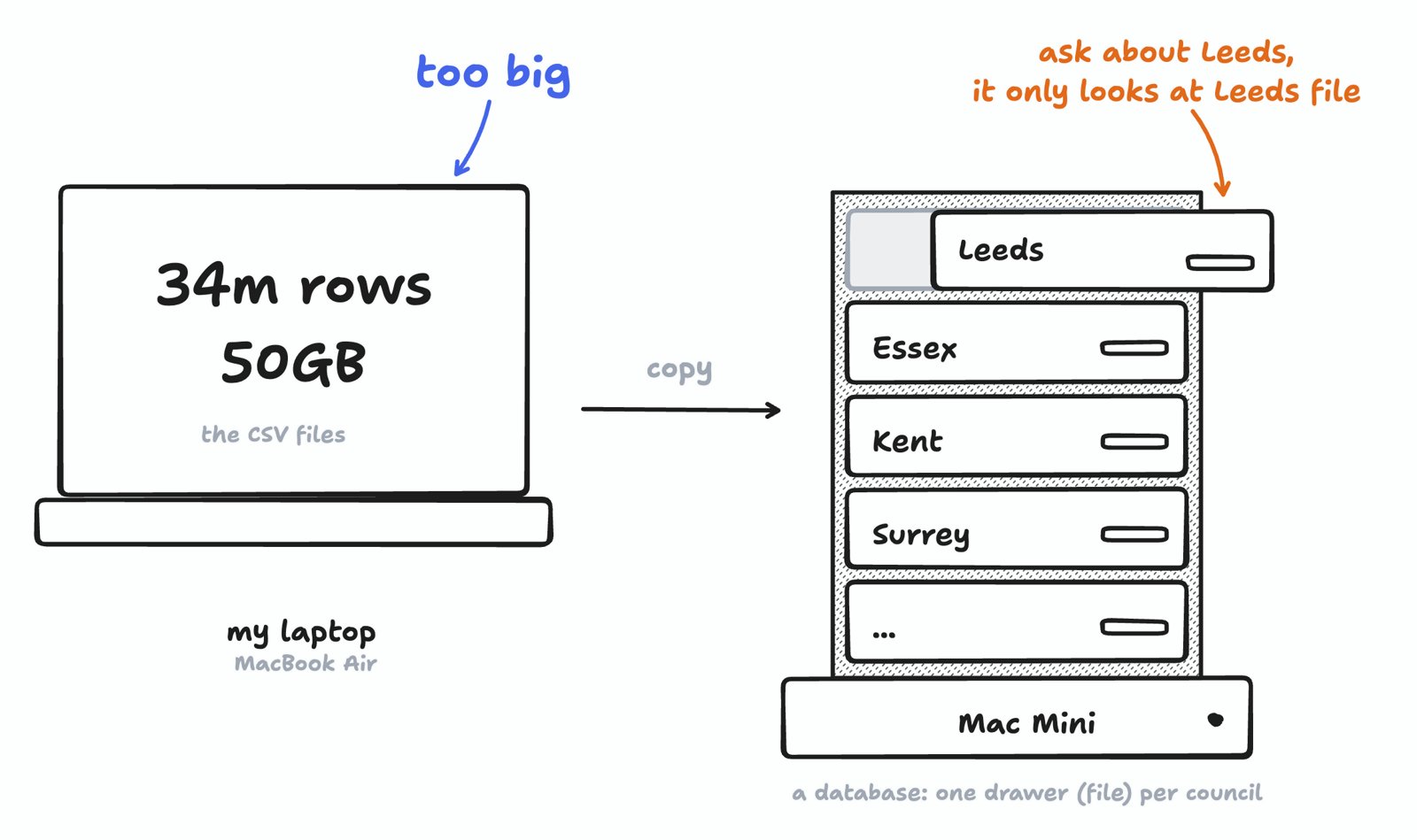
My Friday posts did a bit of that. I often used a canvas to explain certain things at certain moments: technical concepts, or how a project actually works. This thing connects to this thing, connects to that thing. This one is from session #5, when the data got too big for my laptop:
None of these people are who I’m trying to be, and I’m not trying to copy them. I’m looking at what each of them does, and the way they approach it, to figure out what my own combination is.
Not automated
Then I jumped ahead. Why not have a system that finds the story for me? It could go through all my sessions every day and pull out the setup, the conflict and the resolution, so I’d have daily inspiration coming through.
bites laid out how that could work. It would look at my work log, my coding agent’s threads and my to-do board, then nudge me with two ideas a day, each with a setup, a likely snag and a payoff.
As it was telling me, I went off the idea. This whole process isn’t supposed to be automated. I’m supposed to still have the creativity and the freedom to think about what I was trying to do in a session, and how that came together.
The automated pieces are the making. Getting the post set up at 16:9, making sure the tools are ready, making sure the export happens, any very light editing, uploading to YouTube, then putting it on the sessions page with the YouTube link. That’s where the work should be automated. The thinking part, the creative part, is what I still want to do.
Getting the look
Next was how these should look. I’d just made the video for my newsletter pipeline post. Looking back, when I mentioned a database, a drawing would have helped, like the ones in my Friday posts.
Then I wondered what it would be like to go to the extreme: the whole thing made in a canvas, with minimal writing, and my prompts in shapes instead of paragraphs.
I’d also seen Kevin Ngo’s hand-drawn diagrams, built on a tool called pele. Pele is an open-source tool by kepano, who runs Obsidian. I knew it drew shapes. I thought it was something to do with lining things up, but I didn’t really know what the benefit was.
Words turn into boxes and arrows. You write which thing connects to which, as plain text, and pele works out where every box and arrow goes. Change the words and it redraws straight away, fast enough to keep up while you type, or while an agent types. Try it:
There’s one more thing it gives me. Each box pele draws has a name, so a note on a drawing can point to the right box: the arrow is linked to that box, and it lands on it.
A page, not a canvas
So I asked my personal agent to start a task with my coding agent: make a version of my newsletter pipeline story in this style.
The first version was an actual tldraw canvas. I didn’t need the tool itself, I just needed the style: the font, and how the boxes and arrows are drawn. To put tldraw on a site you need a licence, and this is still a blog-post-style page. I just want canvas visuals throughout it.
The second version was a plain page, but it had lost the arrows and annotations, the bit I liked most. So I said so, and it put them back.
A real test
With those fixes in, I wanted to try it on something real. The Anthropic S-1 (its filing to go public) had just come out, so I got my coding agent to read it and explain it in the same style.
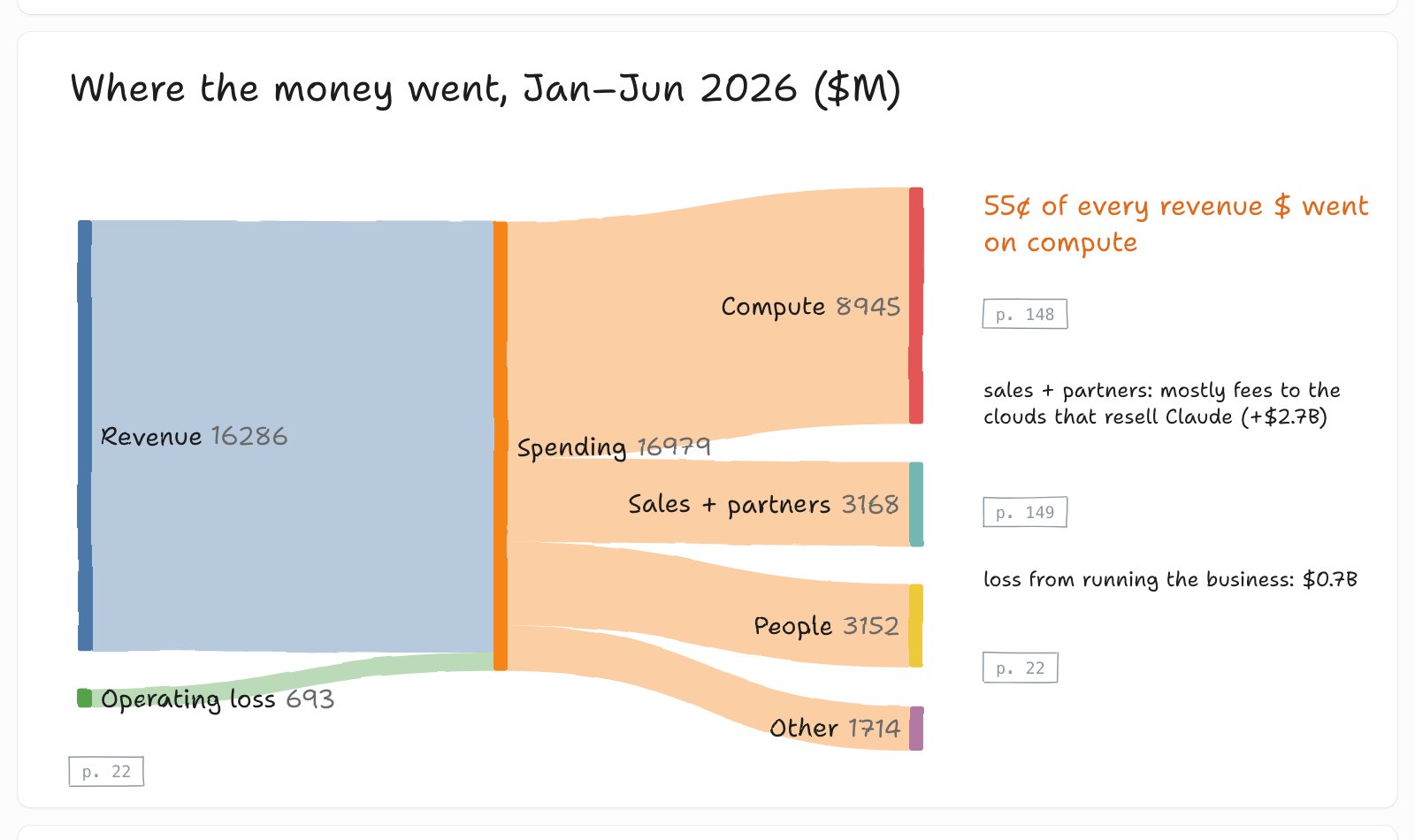
I really like that style. It’s how I want the visuals in my sessions posts. It feels a lot like my Friday posts, and I find it helpful to learn that way, with visuals laid out in a canvas and arrows between things.
I want the format to be so enjoyable that I really like creating these posts. If I’m going to do these videos time and time again, I need to enjoy the process of making the post and the video. If I enjoy it, and it’s good visually, I think I’ll stick with it for longer.
I think about The Pudding and Acquired. Even when it’s a topic I have no interest in, I enjoy the format of each of them so much that I consume everything they do anyway.
Making it repeatable
Then I wanted to make this repeatable. I got my coding agent to build a kit, so any of my agents, in a fresh session, can make visuals at this level.
I didn’t want the kit to be too rigid. Things that only made sense for the S-1 page, like a page number on every claim and a heading on every drawing, shouldn’t be in every story. I didn’t want every post to look exactly the same every single time. So I said to keep it flexible: the agent should have the freedom to draw whatever it needs to draw, with some consistency in what certain things look like, like arrows and boxes.
So now there are parts. A box, my prompt, an agent and a web page look the same every time. If I change how one of them looks, it changes everywhere. Anything else gets drawn fresh, with the same pen, so it still matches. If the agent draws the same new thing more than once, it becomes a part.
The drawings also used to draw themselves in, line by line. I turned that off. I just wanted them static.
Where I’ve got to:
Copy this
How this was made
Models
- Talking it through: bites in Grok Bot
- The drawings and the kit: my coding agent on pi ·
claude-opus-5-5 - This post and its drawings: pi ·
claude-opus-5-5
Code and tools
- rough.js: the sketchy lines
- pele: diagrams from plain text
- Shantell Sans: tldraw’s font, free to use
- canvas kit: my starter, so any agent draws in the same style
Design
- My Friday posts: the drawings I want to get back to
Data sources
- My chats with bites and my coding agent, 26 and 27 Oct