
My bookmarks write the first draft
I save a load of things in my X bookmarks. Most of it is for the newsletter. Ben’s Bites goes out on a Tuesday and a Thursday, at 2pm UK.
The person who puts it together with me leaves at the end of the year. So I wanted the whole pipeline automated. A draft already sitting in Substack when I go in on a Tuesday morning. Then I can just hit record, or write an intro.
I was rambling at bites, my chief of staff agent, about something else. In the middle of it I asked for this:
This is it, working, with made-up saves. It’s the page I get on a Monday night. Change a tag, write a note, then open History.
How it’s wired
Tap a box to see what it does. In order:
- I save posts on X. That’s the only thing I do by hand.
- Every 15 minutes, a script on my Mac copies new saves into a database.
- Monday and Wednesday at 7pm, it picks. One model reads every save since the last issue went out, all in one go. For each save it says intro, feed, afters or “not used”, and why. For the picks, it writes a one-line draft. That’s the preview.
- The preview goes on the review page. That’s the one at the top. I change anything I don’t agree with, and every change is logged.
- Tuesday and Thursday at 6am, it runs again with my changes in, and writes the draft into Substack. Not published.
- After I send, it looks at what went out against what it picked, and suggests changes to how it picks. I say yes or no.
It all runs on my Mac. If the Mac is off at 6am, there’s no draft.
The rest is one part at a time, in the order you’d build them.
Saves come in
I already had this. My bookmarks site is from March. Every 15 minutes, a script on my Mac pulls my new X bookmarks into the database. There were 5,320 saves when I started this.
This build changed one thing. It keeps more of what’s behind each save now: the title and first bit of the linked page, the quoted post, and the post it was replying to. I’d asked for the text from blog links, tweets and media.
My script is just a local tool. You don’t need it. You just need your saves to land somewhere, with the text behind each link. The easier way: connect X to Executor, or to your Grok Bot, and have it do the same every 15 minutes.
The rules
It needs three things before it can pick: when, what, and what good looks like.
When. The first version just pulled the last 7 days, so a bunch of things repeated. I sent a voice note. Tuesday’s issue needs every save since Thursday’s send. Thursday’s needs every save since Tuesday’s. I never want them to overlap. So now it checks the time of the last send and only takes saves after that.
What. The newsletter has three sections, and you can’t always tell from a save which one it goes in. In the same voice note:
So the bot went through 78 of my past issues. It worked out my sections from what I’d actually put in them.
Then it called a podcast episode about me a “Workflow”. I asked why. It had no option for “about me”, and nothing told it @bentossell is me. So I wrote the sections down:
That’s in the instructions the model gets on every run now. Here they are:
Sections are exactly:
intro: the theme or cluster of the window, Ben's own work, or his own take.
feed: tools, blog posts, videos, podcasts, workflows, tips, skills, use cases, big model news, new lab features.
afters: people's takes, opinions, memes, funny/satire, visually interesting AI demos.
not_used: not selected, including personal-interest saves: things to build, visual interactions to copy, inspiration, business, watching how developers work.
Ben is @bentossell. A topic cluster is an intro signal, not a reason to put every related save in intro.
What good looks like. For each of those 78 issues, the bot matched what I saved between sends with what actually ran, and in which section. That’s 2,629 saves, each with the answer. Normally you’d need someone to label thousands of examples by hand. My past issues already had the answers.
So to test a model, we give it an old week’s saves and count how many of the stories I actually ran it picks.
The weekly pick
Monday and Wednesday at 7pm, a preview. Tuesday and Thursday at 6am, the draft. Both times, one model, GPT-6.1 Sol, reads every save since the last send, all at once. It gets two of my past issues as examples. For each save it gives a section or “not used”, one line on why, and a one-line draft if it’s a pick.
It didn’t start there. The first version used Jev, because it’s a cool new tool and I wanted to play around with it. It scored one save at a time. At best it found 68% of my picks. Six subagents each tried giving it more context: a profile of me, the text behind each link, transcripts, images. None of it helped. So I asked:
The agent came back with one thing we hadn’t tried: a normal model reading the whole week at once. I said “you decide what other models to try”. So it tried a bunch. DeepSeek, GLM, Qwen, Luna, Haiku and Gemini Flash-Lite, one save at a time. Sol, Gemini, GLM and Haiku, the whole week at once. All tested on my past issues.
Sol reading the whole week won. It picked about 7 in 10 of the stories I actually ran. It’s also the simplest: one call, nothing bolted on. About 3 cents an issue.
The review page
I wanted a page in my bookmarks site where I could see what got put where. So I asked:
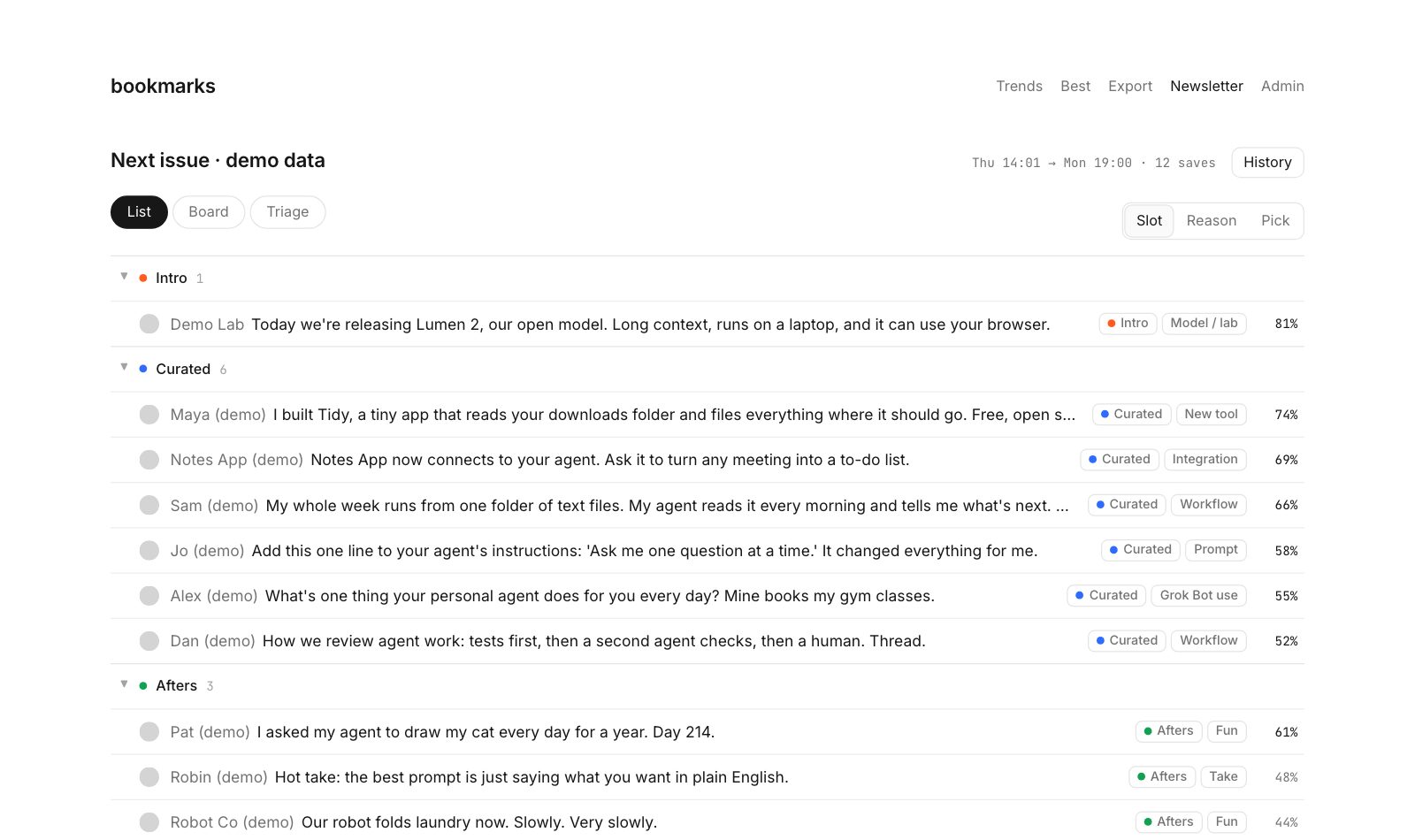
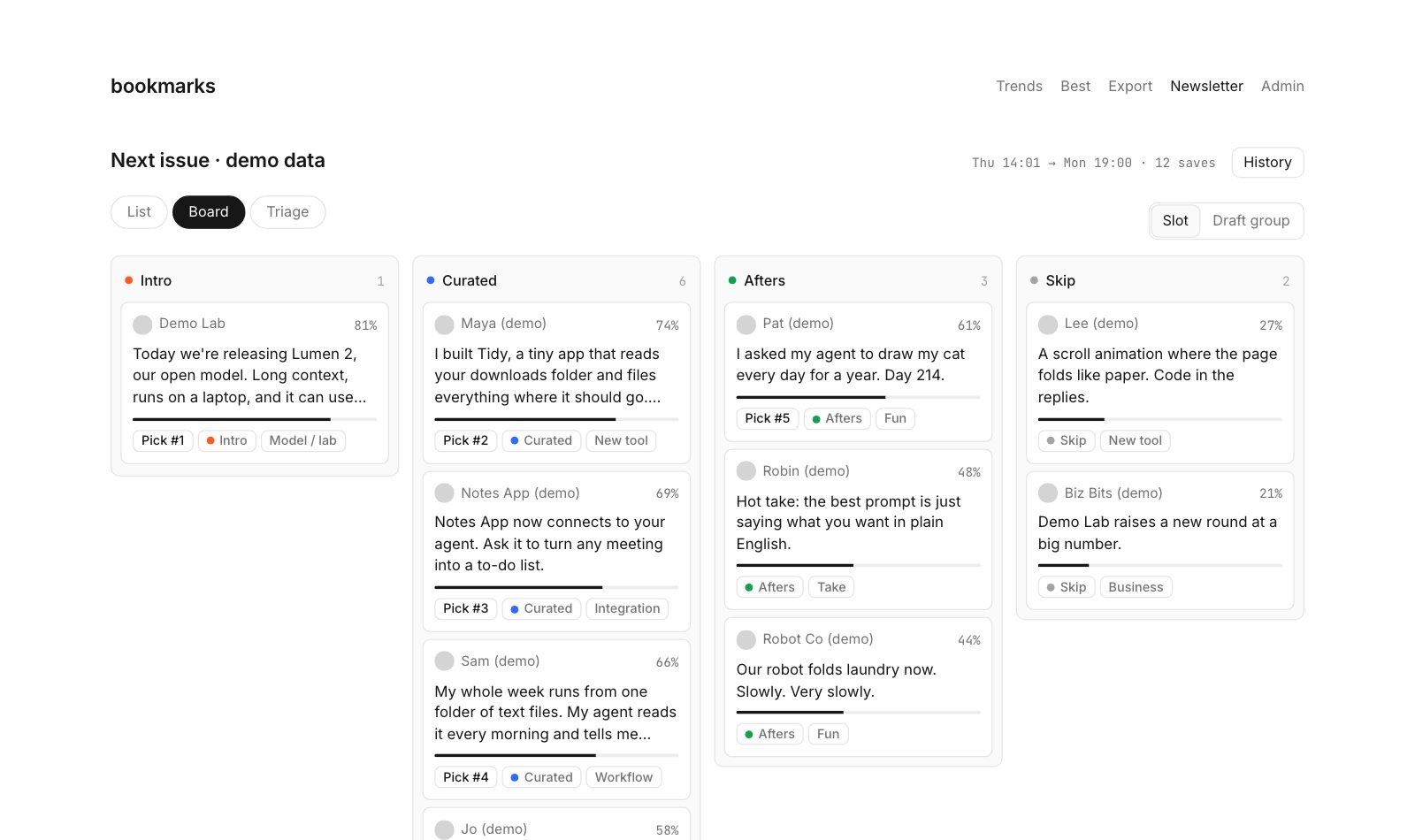
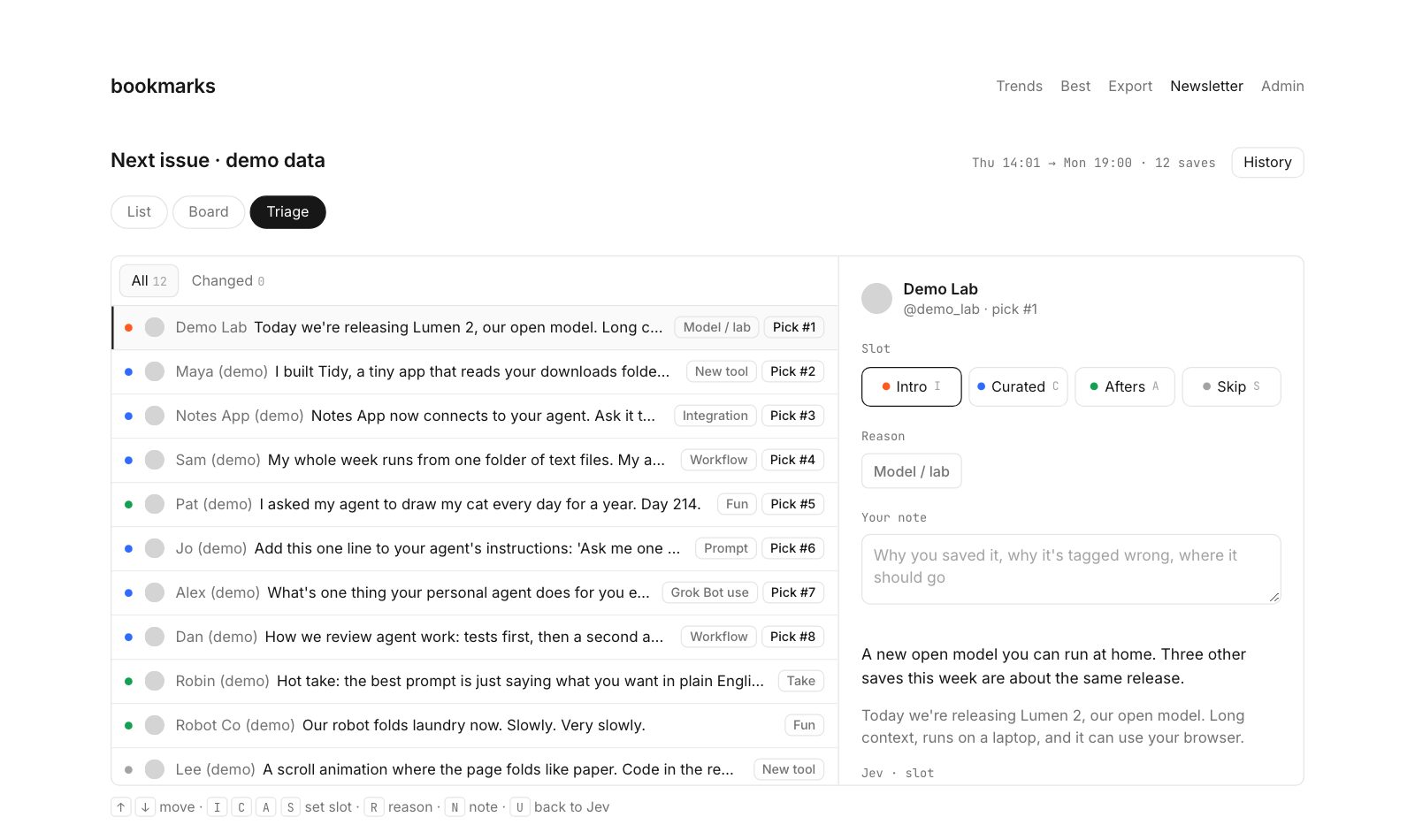
All three are in the site now. The page at the top opens on List.
Then I wanted to change the tags myself, and for every change to be logged. I was thinking it could learn from my changes over time. Nothing gets deleted. An undo is just a new line.
The Substack draft
At this point the review page was just a prototype, with one week’s saves pasted in. Nothing ran on a schedule. Nothing wrote to Substack. Six subagents had just run the context tests. So:
24 Codex agents worked through the night. Four built one part each: what gets saved with each bookmark, the review page in the site, the scheduled run, and the loop after I send. Nine just checked. They ran the real commands, opened the page in a browser, and sent back what broke. Five fixed things. One put it all together. By half one in the morning it was built and pushed.
So at 6am, a timer on my Mac starts the script. It grabs the saves since the last send, sends them to the model, and saves the draft as a file. Then it signs in to Substack like my browser does, and makes the draft through Substack’s own drafts API. No browser opens. It never touches a published or scheduled post.
# [Title]
[Subtitle]

Hi folks,

[Intro]
[Intro source]  [Intro source]

### Video
[VIDEO PLACEHOLDER: Ben's short clip for this issue]

[Sponsor]

### Headlines
[Headlines]

### My feed
- Lumen 2 is an open model that runs on a laptop and can use your browser. [Source]
- Tidy is a free app that files everything in your downloads folder. [Source]
- Notes App now connects to your agent and turns meetings into to-dos. [Review source] [Source]
- Sam runs the week from one folder of text files his agent reads each morning. [Source]
...
The brackets are mine to fill in. I still write the title, the intro, the sponsor and the Headlines, and pick the Try this. Every feed line has its source.
After I send, a job looks at what went out, what it picked, and what I changed. It doesn’t change itself. It just suggests. A change only goes in if I say yes, and it passes the same test on past issues.
Copy this
Send your agent this: sessions.bensbites.com/newsletter-pipeline/build.md. It’s the parts above, the prompts and the setup, with my tools marked so you can swap in yours.
Here it is again. Pick something, move it to Afters, and check History.
Behind the build
- Fri 16 Oct, 16:30: asked bites for it, no discussion first
- 16:47: first version, with a test draft in Substack
- 16:56: voice note: the send times, and learn the sections from my past issues
- 18:58: labels fixed, Jev finds 68% of my picks
- 20:22: moved to a coding thread. List, Board and Triage
- 21:07: six experiments at once. More context didn’t help
- 22:27: the bake-off, then build, check and fix, all overnight
- Sat 17 Oct, 01:23: built and pushed
- Mon 19 Oct: checked for Tuesday, Video slot added
- Tue 20 Oct, 06:00: the first run. The push to Substack failed (it pointed at a deleted test draft). Fixed, draft in Substack at 06:11
How this was made
Models
- Picking and writing the lines: GPT-6.1 Sol through OpenRouter ·
openai/gpt-6.1-sol - Checking each line against its source: Jev ·
jev-1.14.0 - The first version: Grok Bot (bites and my Ben’s Bites bot)
- The coding thread: pi in bb · Claude Opus 5.5, medium
- The experiments: 9 pi threads in a bb workflow
- The bake-off and the build: 24 Codex threads · GPT-6.1 Sol, high
- Tried and dropped: ScaleDown, DeepSeek V4.1 Flash, GLM 5.3 Flash, Qwen 3.8 Flash, GPT-6 Luna, Claude Haiku 5.5, Gemini 3.5 Flash-Lite, Gemini 3.8 Flash
Code and tools
- bb: the threads and the workflows
- bird: reads my X bookmarks every 15 minutes
- Supabase: the database of saves, runs and my edits
- Next.js on Vercel: the review page
- Python: the weekly run
- Substack: where the draft lands
- Cost: about 6–10 cents a build
Design
- emil-prototype: the three versions of the list
- Linear: the look I asked for
Data sources
- My X bookmarks
- 78 past issues of Ben’s Bites, from the archive behind wayback.bensbites.com